
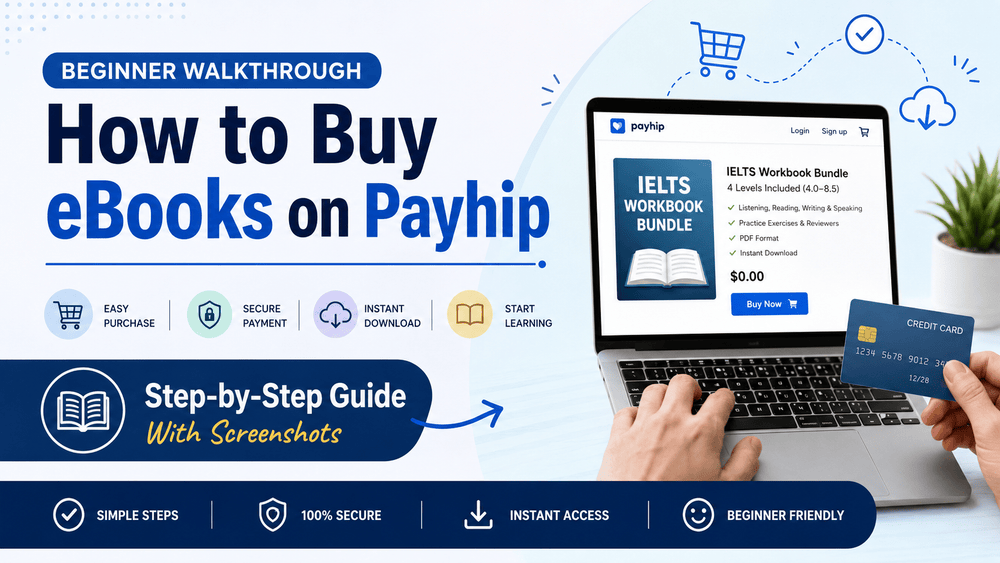
If you're new to buying digital products online, you may be wondering how to purchase and download eBooks from Payhip. The good news is that Payhip is designed to make the process simple, secure, and beginner-friendly.
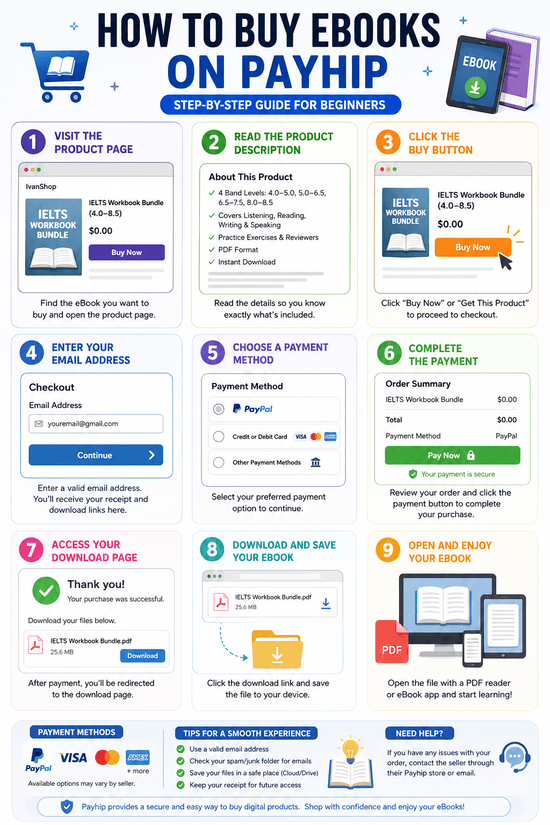
Whether you're buying educational resources, business guides, fiction novels, or workbook bundles, this step-by-step guide will show you exactly how to buy eBooks on Payhip and access your files after payment.
In this tutorial, you'll learn how the purchasing process works, what payment methods are available, and how to download your eBooks safely.
What Is Payhip?
Payhip is an e-commerce platform that allows creators, authors, educators, and digital entrepreneurs to sell digital products directly to customers.
Thousands of sellers use Payhip to distribute:
- eBooks
- Online courses
- Study materials
- Templates
- Printables
- Software
- Membership content
When you purchase an eBook through Payhip, your payment is processed securely, and you receive instant access to your digital files.
Why Buy eBooks Through Payhip?
Many customers prefer Payhip because it offers:
Secure Payments
Payhip works with trusted payment providers such as:
- PayPal
- Credit cards
- Debit cards
Your payment information is processed securely through established payment gateways.
Instant Delivery
Unlike physical books, eBooks purchased through Payhip are usually available immediately after payment.
Easy Downloads
Once your order is completed, Payhip provides direct download links so you can access your files quickly.
Mobile-Friendly Experience
You can purchase and download eBooks using:
- Desktop computers
- Laptops
- Smartphones
- Tablets
Step 1: Visit the Product Page
The first step is to visit the eBook product page.
You can usually find the product through:
- Google search results
- Social media posts
- Blog recommendations
- Direct links from the seller
When you open the page, you'll see important information such as:
- Product title
- Description
- Price
- Product preview (if available)
- Purchase button
Step 2: Read the Product Description
Before purchasing, take a few moments to read the description carefully.
Look for details such as:
- What is included
- File formats available
- Number of pages
- Intended audience
- Download instructions
A well-written product description helps you understand exactly what you're buying.
For example, if you're purchasing an IELTS workbook bundle, the description may explain:
- Skill levels covered
- Practice exercises included
- Target band scores
- Learning outcomes
Step 3: Click the Buy Button
Once you're ready to purchase, click the:
- Buy Now
- Get This Product
- Purchase
- Add to Cart
button, depending on how the seller has configured their Payhip store.
This will take you to the checkout page.
Step 4: Enter Your Email Address
At checkout, you'll typically be asked to provide your email address.
This is important because:
- Your receipt is sent there.
- Download links may be delivered there.
- Future access to your purchase may be connected to that email address.
Make sure you enter a valid email that you can access.
Step 5: Choose a Payment Method
Payhip supports multiple payment options depending on the seller's settings.
Common payment methods include:
PayPal
Pay securely using your PayPal account balance or linked payment methods.
Credit Card
Many stores accept:
- Visa
- Mastercard
- American Express
Debit Card
Most debit cards with online payment functionality are accepted.
I also like to include a GCash payment option for my buyers from the Philippines. Select your preferred payment method and proceed to payment.
Step 6: Complete the Payment
Review your order details carefully before completing the transaction.
Check:
- Product name
- Price
- Quantity (if applicable)
- Payment method
After confirming everything is correct, click the payment confirmation button.
Depending on your payment provider, you may be asked to complete additional verification steps for security purposes.
Once approved, your order will be processed immediately.
Step 7: Access Your Download Page
After successful payment, Payhip will redirect you to a download page.
This page typically contains:
- Download links
- Purchase confirmation
- File information
You can usually download your files right away.
Many sellers also send the same download links to your email address.
Step 8: Download and Save Your eBook
Click the download link to save the file to your device.
Common eBook formats include:
- EPUB
- MOBI
For study materials and workbooks, PDF is the most common format.
It's a good idea to save a backup copy in:
- Cloud storage
- Google Drive
- OneDrive
- Dropbox
- External storage devices
This makes future access easier if you change devices.
.
How to Open Your eBook
After downloading, you can open your eBook using:
PDF Readers
Examples include:
- Adobe Acrobat Reader
- Foxit Reader
- Browser PDF viewer
eReader Apps
Examples include:
- Apple Books
- Kindle (supported formats)
- Kobo
- Google Play Books
Choose the app that works best for your device.
Common Problems and Solutions
I Didn't Receive My Download Email
Check:
- Spam folder
- Promotions folder
- Junk folder
If you still can't find it, contact the seller with your purchase details.
My Download Isn't Working
Try:
- Refreshing the page
- Using a different browser
- Disabling browser extensions temporarily
- Downloading on another device
I Entered the Wrong Email Address
Contact the seller as soon as possible and provide proof of purchase.
Most sellers can help correct the issue.
Tips for Safe eBook Purchases
When buying digital products online:
- Purchase only from reputable sellers.
- Read product descriptions carefully.
- Check customer reviews if available.
- Save your receipts.
- Keep backup copies of downloaded files.
These simple steps help ensure a smooth purchasing experience.
Final Thoughts
Buying eBooks on Payhip is straightforward, even for beginners. The process typically involves visiting a product page, reviewing the description, completing checkout, and downloading your files immediately after payment.
Whether you're purchasing educational resources, business guides, digital workbooks, or entertainment eBooks, Payhip offers a secure and user-friendly way to access digital products online.
If you're purchasing from Ivan's Digital Finds, simply follow the steps above, complete your checkout, and you'll receive instant access to your eBooks so you can start learning, reading, or studying right away.
***
Check some of the eBooks for sale in my store:
- Churches of Nueva Ecija (Cabiao, San Isidro, Gapan, and San Antonio) eBook
- Echoes of San Antonio: The Last Heritage Houses
- True Philippine Ghost Stories eBook Collection (Books 1–37): Complete Bundle of Classic Filipino Horror | Nostalgic & Spine-Chilling Reads
- Goosebumps Complete eBook Collection by R.L. Stine | Classic Horror Series Bundle
- Over 50,000 Resellable eBooks: Your Ready-Made Digital Business Solution
- TikTok Shop / Affiliate Marketing Blueprint 2026
***
Similar stories:
Comments ()